Jenkins integration
XDM has an own Jenkins plugin to allow the execution of tasks and workflows directly from a Jenkins build. The following section describes how XDM is called from a Jenkins job.
Run a task template
To execute a task template from a Jenkins job it is necessary to configure a Jenkins build job. Add the build step Run XDM task template to the job. The next step is to choose the task template that should be executed.
| Each task template execution will create and execute a new task. This task includes all parameters that have been specified for the task template execution. |
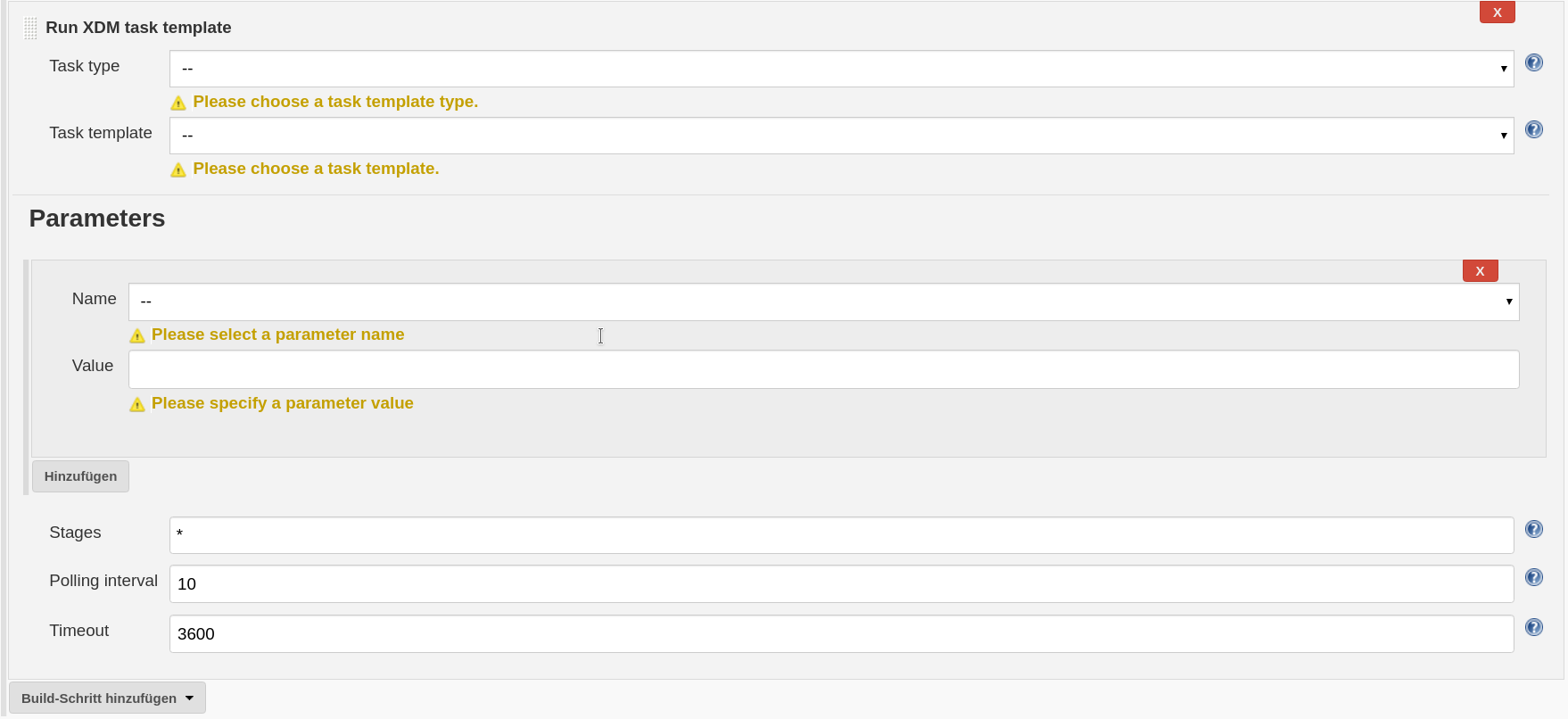
Specify the task template as follows:
- Task type
-
Shows a list of available task template types. Please choose the task template type intended to execute.
- Task template
-
Shows a list of available task templates of the specified Task type. This list has been read from the remote XDM core server and shows only these templates on which the configured user has access to.
- Parameters
-
The Parameters button enables the user to specify parameters of the task template. This includes common task template parameter but also custom parameters that have been added to the selected task template. Each specified parameter will be stored in the newly created task and overwrites the setting of the task template.
- Stages
-
Specifies a list of stages that should be executed. By default, all stages of the task are executed. If only a few stages need to be executed, the user can specify these stages separated by a comma. For example specify Stage1, Stage2 if only the first two stages should be executed
- Polling interval
-
The polling interval specifies the number of seconds the plugin will wait to check if the execution is still running or has already been terminated. The default is 10 seconds, which means that the plugin will check the running task status every 10 seconds to determine if the execution has been finished or not.
- Timeout
-
The timeout specifies the number of seconds after which the observation of the task execution terminates. If the task execution has not been finished within the specified number of seconds the build step fails, however the task on the XDM core might still run. This setting is basically a safeguard to avoid that the build step hangs endless if something fails during the task execution. The default setting is one hour (3600 seconds). If there are tasks with an expected runtime longer than one hour, increase the timeout respectively.
Run a task
To execute a task from a Jenkins job it is necessary to configure a Jenkins build job. Add the build step Run XDM task to the job. The next step is to choose the task that should be executed.
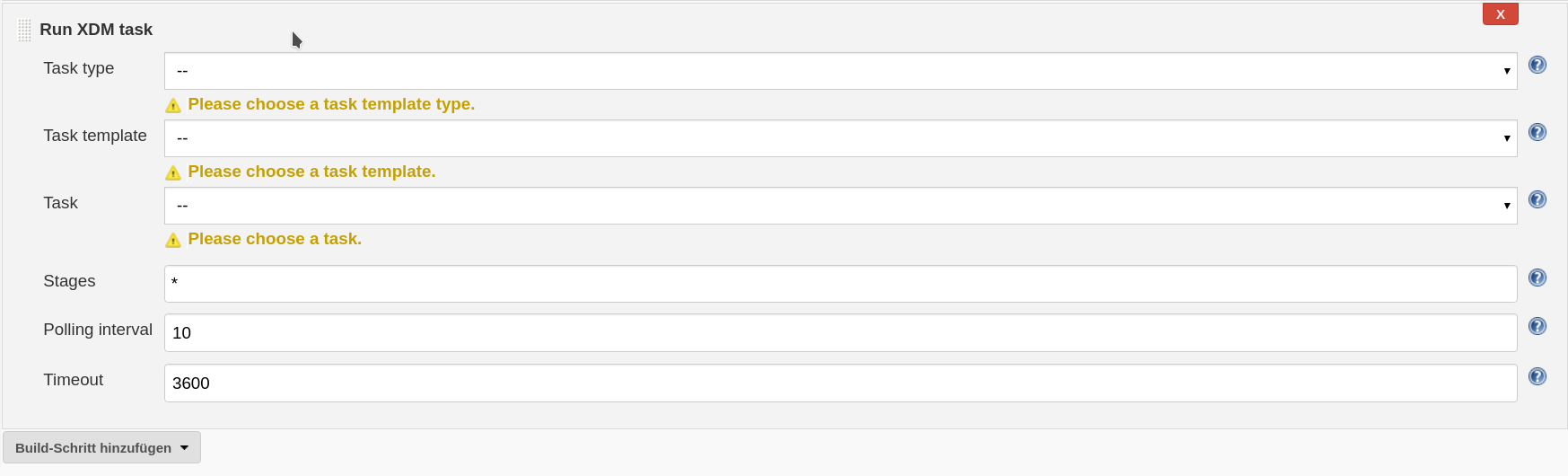
Specify the task as follows:
- Task type
-
Shows a list of available task template types. Please choose the task template type of which a task should be executed.
- Task template
-
Shows a list of available task templates of the specified Task type. This list has been read from the remote XDM core server and shows only these templates on which the configured user has access to.
- Task
-
Shows the list of tasks of the selected template. The list shows only these tasks on which the configured user has the EXECUTE permission. Please choose the task to be executed.
Beside these basic settings it is also possible specify advanced settings by clicking the Advanced button. This will show the following fields:
- Stages
-
Specifies a list of stages that should be executed. By default, all stages of the task are executed. If only a few stages need to be executed, the user can specify these stages separated by a comma. For example specify Stage1, Stage2 if only the first two stages should be executed
- Polling interval
-
The polling interval specifies the number of seconds the plugin will wait to check if the execution is still running or has already been terminated. The default is 10 seconds, which means that the plugin will check the running task status every 10 seconds to determine if the execution has been finished or not.
- Timeout
-
The timeout specifies the number of seconds after which the observation of the task execution terminates. If the task execution has not been finished within the specified number of seconds the build step fails, however the task on the XDM core might still run. This setting is basically a safeguard to avoid that the build step hangs endless if something fails during the task execution. The default setting is one hour (3600 seconds). If there are tasks with an expected runtime longer than one hour, increase the timeout respectively.
Run a workflow
To execute a workflow template from a Jenkins job it is necessary to configure a Jenkins build job. Add the build step Run XDM workflow template to the job. The next step is to choose the workflow template that should be executed.
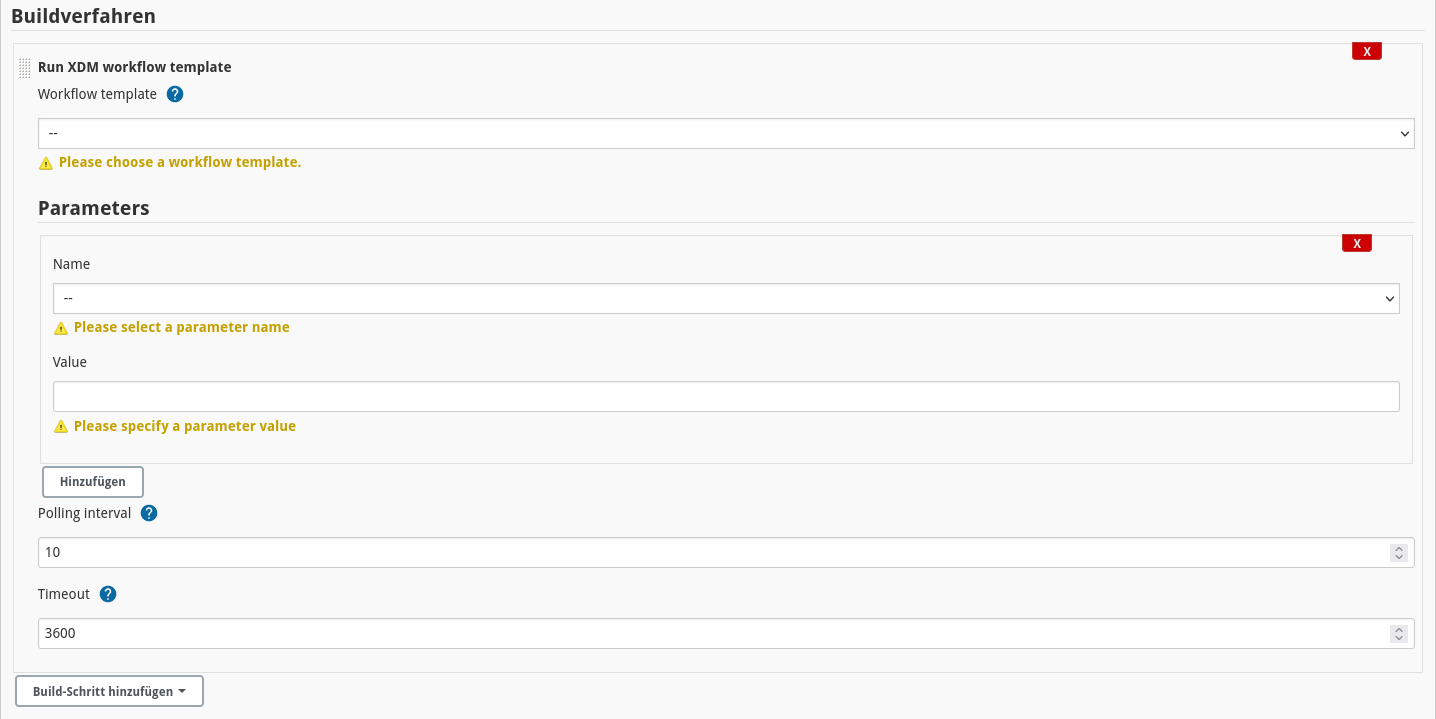
This is specified as follows:
- Workflow template
-
This field contains a list of defined workflow templates that have been read from the configured XDM core service. The list contains only these workflows on which the configured user has access. Please choose the workflow to be executed.
- Parameters
-
Users can (re)define parameters for the workflow template by clicking the Add button. Then the user gets a list of possible parameter names and an input text field for specifying a new value.
Beside these basic settings it is also possible to specify advanced settings by clicking the Advanced button. This will show the following fields:
- Polling interval
-
The polling interval specifies the number of seconds the plugin will wait to check if the execution is still running or has already been terminated. The default is 10 seconds, which means that the plugin will check the running task status every 10 seconds to determine if the execution has been finished or not.
- Timeout
-
The timeout specifies the number of seconds after which the observation of the task execution terminates. If the task execution has not been finished within the specified number of seconds the build step fails, however the task on the XDM core might still run. This setting is basically a safeguard to avoid that the build step hangs endless if something fails during the task execution. The default setting is one hour (3600 seconds). If there are workflow templates with an expected runtime longer than one hour, increase the timeout respectively.
Run a workflow
To execute a workflow from a Jenkins job it is necessary to configure a Jenkins build job. Add the build step Run XDM workflow to the job. The next step is to choose the workflow that should be executed.
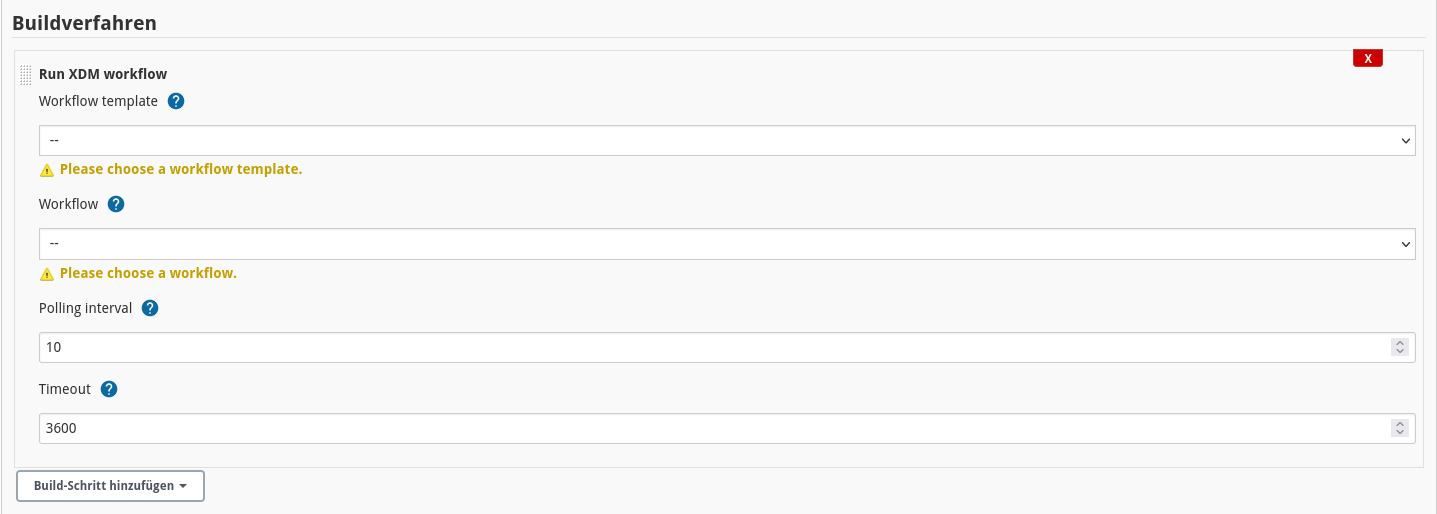
This is specified as follows:
- Workflow template
-
This field contains a list of defined workflow templates that have been read from the configured XDM core service. The list contains only these workflows on which the configured user has access. Please choose the workflow to be executed.
- Workflow
-
Shows the list of workflows of the selected template. The list shows only these tasks on which the configured user has the EXECUTE permission. Please choose the workflow to be executed.
Beside these basic settings it is also possible to specify advanced settings by clicking the Advanced button. This will show the following fields:
- Polling interval
-
The polling interval specifies the number of seconds the plugin will wait to check if the execution is still running or has already been terminated. The default is 10 seconds, which means that the plugin will check the running task status every 10 seconds to determine if the execution has been finished or not.
- Timeout
-
The timeout specifies the number of seconds after which the observation of the task execution terminates. If the task execution has not been finished within the specified number of seconds the build step fails, however the task on the XDM core might still run. This setting is basically a safeguard to avoid that the build step hangs endless if something fails during the task execution. The default setting is one hour (3600 seconds). If there are workflows with an expected runtime longer than one hour, increase the timeout respectively.