Sample Environment
The sample environment that ships with XDM represents a database used by the human resources department of a company. It is shipped with XDM in the form of two Docker images:
-
docker.ubs-hainer.com/sample-environment:latestcontains a sample PostgreSQL database. -
docker.ubs-hainer.com/linuxserver/openssh-server:version-9.0_p1-r2contains an SSH server
The PostgreSQL server listens for incoming connections on port 5432, and the SSH server listens for incoming connections on port 2222.
The file docker-compose.yml is a configuration file for
docker-compose that combines these two images into an application and
creates a shared volume that is accessible as /xdmdata in both images.
Starting and stopping the sample environment
You can start the sample environment either as part of the startup process of XDM itself (alongside XDM), or you can start it separately.
When the sample environment is started alongside XDM, the TCP ports on which
the PostgreSQL database and the SSH server listen for connections will not
be exposed outside of the Docker network. This means that XDM itself will be able to
connect to both PostgreSQL and SSH by using the host names sample-pg and
sample-ssh, but other programs cannot connect.
When the sample environment is started separately, the ports 5432 (for PostgreSQL) as well as 2222 (for SSH) will be exposed so that it is possible to connect from other machines by accessing these ports on the machine where the sample environment is running.
To start the sample environment alongside XDM itself:
-
Edit the file
docker-compose.yml. Scroll to the bottom of the file and locate a section that is commented out and titled "Uncomment ALL of the following lines…". -
Remove the pound signs (
#) at the beginning of each of the following lines so that they are no longer comments, but real statements. Do not delete or add any spaces and do not add any tabs. -
Save the file.
If XDM is currently not running, you can start XDM itself and the sample environment by entering the following command:
docker compose up -d
When the sample environment is started alongside XDM, it will be shut down when XDM is shut down.
To start the sample environment separately:
-
Use the
cdcommand to change into the base XDM directory. -
Use the
cdcommand to change into the subdirectorysample-environment. -
Enter the following command:
docker compose up -d
The parameter
-dstarts the sample environment in the background so that it will keep running when you exit the shell.
When the sample environment is started separately from XDM, you can stop it without stopping XDM itself.
To stop the sample environment:
-
Use the
cdcommand to change into the base XDM directory. -
Use the
cdcommand to change into the subdirectorysample-environment. -
Enter the following command:
docker compose down
In the following examples, it is assumed that the sample environment
is started alongside XDM. Therefore, the host names sample-pg and
sample-ssh are used. If you have started the sample environment
separately from XDM, you must replace those host names with the host name
or IP address of the machine where the sample environment is running.
|
Use lookup tables
During the tutorial, lookup tables are used to modify data.
These lookup tables provide a pre-defined set of first and last names, addresses and banking information. The lookup tables are used by the pre-defined XDM masking methods and can be downloaded from https://products.ubs-hainer.com/downloads/XDM3/Lookup-Tables-2.3.232/XDM3_Lookup_Tables.zip.
We will add them later in the tutorial.
Overview of the sample environment
The sample PostgreSQL instance contains two databases:
-
Database
production-
Schema
production
-
-
Database
testing-
Schema
qa1 -
Schema
qa2 -
Schema
qa3
-
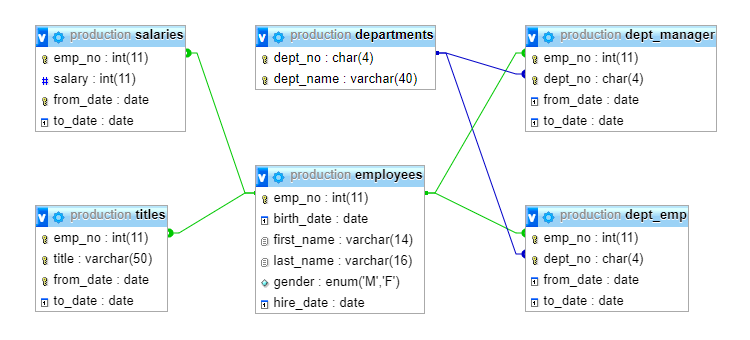
Inside each schema, the following tables exist:
-
departmentsContains one entry per department with department number (
dept_no, primary key) and department name. This table has 9 rows. -
employeesContains one entry per employee with employee number (
emp_no, primary key) and additional details about the employee, such as name or date of birth. This table has 300,024 rows. -
dept_managerKeeps track of who was the manager of each department during which period of time. This table is a child table of the the table departments (via the column
dept_no) and the table employees (via the columnemp_no). This table has 24 rows. -
dept_empKeeps track of which employee works in which department during which period of time. This table has 331,603 rows.
-
salariesKeeps track of each employee’s salary and the salary’s duration. This table is a child table of the table employees (via the column
emp_no). This table has 2,844,047 rows. -
titlesKeeps track of the duration for which each employee had a particular job title. This table is a child table of the table employees (via the column
emp_no). This table has 443,308 rows.
The following image illustrates the relationship between the tables:
In the schema production, the tables contain data. In the schemas qa1, qa2
and qa3, the tables are initially empty.
Three different user accounts exist in the sample PostgreSQL instance:
| Username | Password | Description |
|---|---|---|
|
|
Has read and write access to the tables in the schema |
|
|
Has read-only access to the tables in the schema |
|
|
Has read and write access to the tables in the schemas |
The three different QA departments have the following requirements for their test data provisioning process:
-
qa1needs to have a full copy of all tables. -
qa2needs to have a full copy of all tables, but employee names and dates of birth must be masked -
qa3needs to have a copy of the records of those employees that work in the department Customer Service, and employee names and dates of birth must be masked.
An SSH server is running alongside the database server. The directory /xdmdata
is shared between the two servers, and the following SSH user is
pre-configured:
| Username | Password | Description |
|---|---|---|
|
|
Has access to the |
Previous section: Overview | Next section: Infrastructure objects