Create virtual tables using XDM
Overview
The creation of virtual tablespaces and tables in file bridge is based on a COBOL copybook.
It can be initiated using the browser user interface.
In the first step a copybook is converted into an SQL file with the necessary
CREATE statements for tablespaces and tables.
After optionally adjusting the SQL file, it can be executed on the file bridge server using the apply SQL action.
Convert COBOL copybook to SQL file
As a prerequisite the COBOL copybook must be available on your local machine. For this example we use the following record definition:
      *----------------------------------------------------------------
      *
      *   Sample Copy Book (XDM.DEMO.COPYBOOK)
      *
      *
      *------------|-------------|-------------------------------------
       05  P-K-VERTRAG.
           10 P-K-BER-LAUFEND.
             20 P-K-LAENGE                   PIC S9(4)         COMP.
             20 P-K-SART.
               30 P-K-SART1                  PIC X.
               30 P-K-SART2                  PIC X.
             20 P-K-PZ                       PIC X.
             20 P-K-KEY.
               30 P-K-VS-NR                  PIC S9(13)        COMP-3.
               30 P-K-VS-NR-DAT              PIC S9(9)         COMP-3.
This is a relatively simple structure used for this example. Typically, a COBOL structure will have a more exhaustive range of field types.
The conversion action for copybooks can be opened on every file bridge connection in the XDM user interface. The convert action only performs a text conversion within XDM. The copybook definition on the server itself remains unchanged.
The conversion action is configured as follows:
| Field | Value |
|---|---|
VSAM data set name |
XDM.DEMO.VSAM |
Copybook data set name |
XDM.DEMO.COPYBOOK |
Virtual table schema |
DEMO |
The VSAM data set name is the dataset containing the data which will be read and written by the file bridge server. The Copybook data set name needs to contain the copybook as used by the conversion. The Virtual table schema is used for the virtual table in the file bridge server catalog.
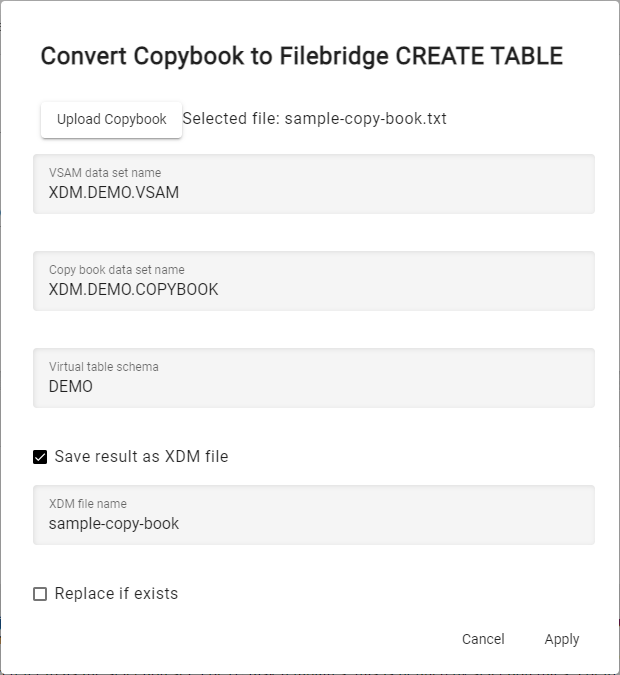
The action allows you to store the result in XDM or to download the converted file. For the purposes of this example, select Save result as XDM file.
The XDM files are located in the XDM Configuration section of the main menu under Files. You can download the file to check the contents and perform edits. Afterward, the changed file contents can be loaded back to the XDM file using the Replace content action.
The copybook conversion creates an SQL file with the following contents:
CREATE TABLESPACE S9A40EE3
   FILE 'XDM.DEMO.VSAM' ENCODING 'IBM1047'
   DESCRIPTION IN FILE 'XDM.DEMO.COPYBOOK' ENCODING 'IBM1047'
   LANGUAGE COBOL (
      REPLACING 'TAG' BY 'XDM' ,
      REPLACING '$'   BY 'XDM'
   )
   USE DFSORT ACCESS
   MIN THRESHOLD 500;
CREATE TABLE "DEMO"."P-K-VERTRAG" (
   "P-K-LAENGE"       SMALLINT           USES P-K-VERTRAG.P-K-BER-LAUFEND.P-K-LAENGE
,  "P-K-SART1"        CHAR (1)           USES P-K-VERTRAG.P-K-BER-LAUFEND.P-K-SART.P-K-SART1
,  "P-K-SART2"        CHAR (1)           USES P-K-VERTRAG.P-K-BER-LAUFEND.P-K-SART.P-K-SART2
,  "P-K-PZ"           CHAR (1)           USES P-K-VERTRAG.P-K-BER-LAUFEND.P-K-PZ
,  "P-K-VS-NR"        DECIMAL (7 , 0)    USES P-K-VERTRAG.P-K-BER-LAUFEND.P-K-KEY.P-K-VS-NR
,  "P-K-VS-NR-DAT"    DECIMAL (5 , 0)    USES P-K-VERTRAG.P-K-BER-LAUFEND.P-K-KEY.P-K-VS-NR-DAT
) IN S9A40EE3
In some cases it might be necessary to edit the resulting SQL file. For example, you might wish to change certain data types or change names of some columns. You might also want to change the generated tablespace name to something more meaningful.
The resulting SQL file can be executed on the file bridge server to create the virtual tablespace and table. To be able to run the SQL file against the connection, the user needs to have Apply SQL permission.

Perform the Apply SQL action, select the generated file from the XDM files, and execute it.
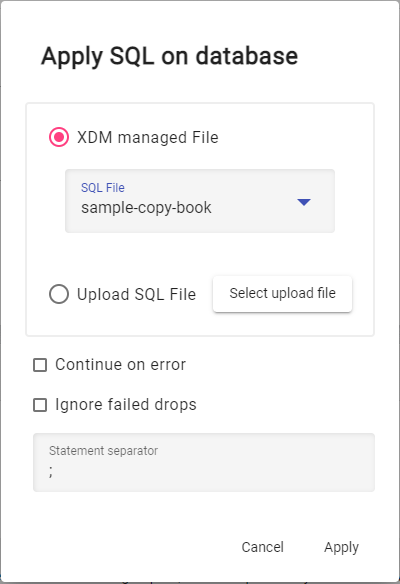
Afterward, you can check the creation of the table in the schema browser of the file bridge connection. The created tables can now be used in XDM tasks using this connection to read and write data.
Using a Stage Hook to create a table in the File Bridge for CSV Files
Normally a table in the file bridge server is created by writing explicit create statements for the file bridge server. But it is possible to do that in an easier way.
There is a stage hook that can be used to create a table in the file bridge with csv files. To use this stage hook correctly, in the first line of the csv file the column headings have to be specified and in the second line the data types for the columns have to be specified. From the third line on the data content itself has to be specified.
Find more information in the description of the stage hook.