Ignore difference rule
Description
Ignore Difference Rules specify which properties should be ignored in the structure difference report during a structure comparison in an XDM structure compare task.
When comparing objects in an XDM structure compare task, known differences are often reported, which the user does not want to alter in the target environment. Such differences are of no interest in the structure difference report.
In some cases (e.g. creation date of the object) it is possible to remove the field from the comparison altogether by deselecting it in the task setup. However, sometimes this is not possible, because only certain difference values are of no interest and the remainder should be reported.
Example: A VARCHAR(500) field in the source environment is changed to a CLOB field in the target environment and this difference is known.
In addition, an unknown difference exists for a column which is defined as type INTEGER in the source environment and defined as NUMBER(12) in the target environment.
Removing the column type field from the comparable fields list will lead
to those fields not being compared, which is not desired here.
To ignore only the known difference, XDM uses Ignore difference rules. When an ignore difference rule is set, the difference is not listed in the structure difference report.
| If all the property comparisons of an object which differ between the source and the target match an ignore difference rule and all child comparisons are deemed to be equal, then the object comparison is also treated as if the comparison result was equal, and the object comparison will not appear in the structure difference report. |
This can lead to a change in the task result: When all differences are matched by ignore difference rules, the task will not be aborted when the option Abort on difference is set.
Only comparisons with result DIFFERENT are ignored by ignore difference rules.
|
Unique constraints will always be set to MISSING if they are not identical in
source and target. Therefore, ignore different rules have no effect on unique constraints.
|
It is possible that a comparison will match more than one ignore difference rule. If a comparison matches at least one ignore difference rule, then that difference will be omitted from the structure difference report.
Examples
These two examples show typical scenarios for using ignore difference rules:
Old data type in a column
In Db2 z/OS the data type LONGVARCHAR is deprecated and cannot be used in new tables.
Instead, a VARCHAR will be used as data type. the property value in order for
the comparison to be ignored.
A structure compare task detects this.
It evaluates all columns with data type LONGVARCHAR in source tables and
VARCHAR in target tables as DIFFERENT
and reports it in the structure difference report.
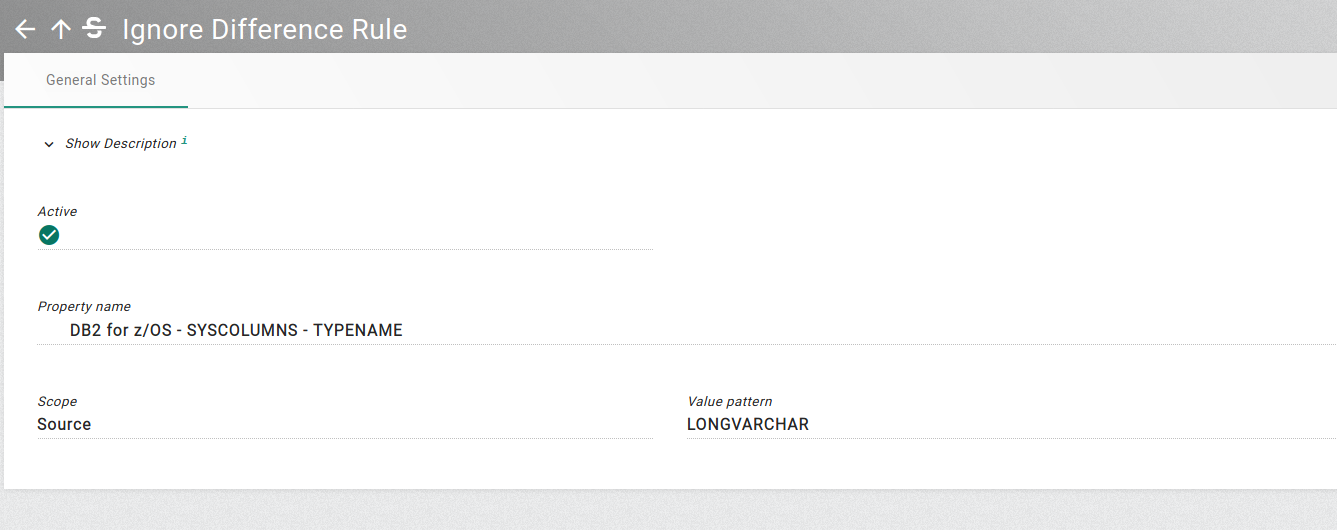
To ignore this differences, an ignore difference rule can be added with
these settings:
-
Property name: DB2 for z/OS - SYSCOLUMNS - TYPENAME
-
Scope: Source
-
Value pattern: LONGVARCHAR
The created ignore difference rule is shown in the UI as below.
Different Check Conditions
For a check constraint on a table, the check condition differs.
It is defined as (COL01 < 1000) AND (COL01 > 0) in the source table
and (COL01 > 0) AND (COL01 < 1000) in the target table.
A structure compare task detects this difference.
It evaluates both the check constraint condition property and the
parent check constraint object as DIFFERENT in the structure difference report.
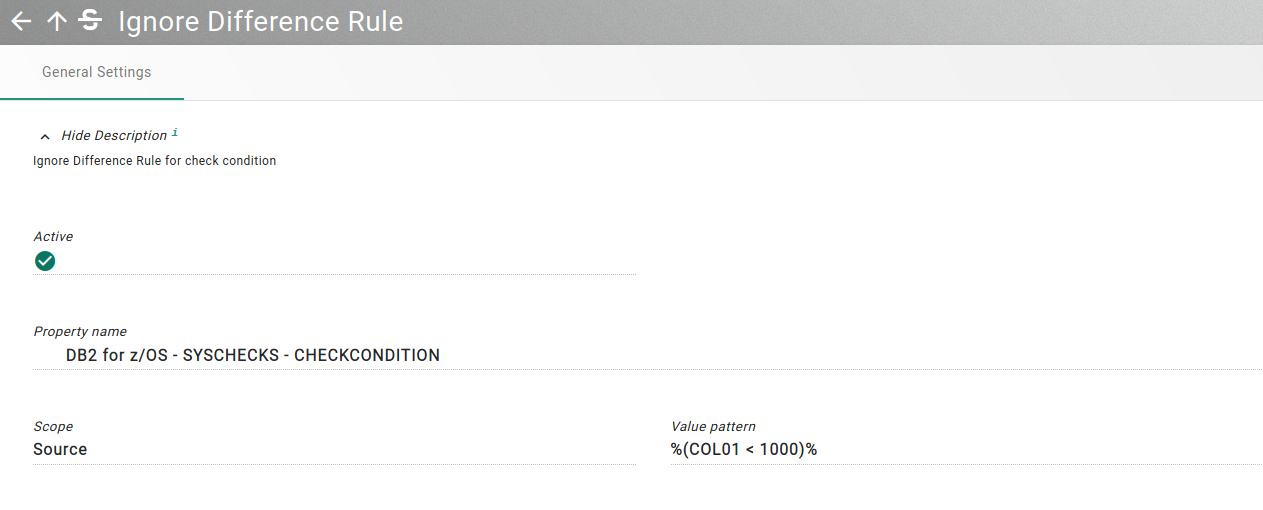
To ignore this differences in check conditions, an ignore difference rule
can be added with these settings:
-
Property name: DB2 for z/OS - SYSCHECKS - CHECKCONDITION
-
Value pattern: %(COL01 < 1000)%
-
Scope: Source
Properties
The table below documents the available properties for ignore difference rules. The 'name' column displays the property name as it can be used in Groovy and Java Scripts.
Name |
Type |
Default |
Description |
||
|---|---|---|---|---|---|
|
active |
Boolean |
true |
Specifies whether the rule is active and therefore used, or inactive and therefore ignored, when a task is executed. |
||
|
comparableField |
ComparableField |
n/a |
Specifies a field from a catalog table for a given database.
|
||
|
description |
String |
n/a |
An optional description for this object. The description can contain multiple lines to give more context on the configured object. The description is not used in a technical context. |
||
|
scope |
Scope |
SOURCE |
The scope can be set to either Source or Target. The scope specifies whether the Value pattern refers to a source or target property value. |
||
|
tags |
Tag |
n/a |
Contains the tags that apply to this object. These tags can be used in the search to find objects quickly and effortlessly. |
||
|
valuePattern |
String |
n/a |
Specifies a value that must match the property value in order for the comparison to be ignored. It is possible to specify either a fixed value, or a selection pattern to match the property value. |
Actions
The available actions are described below. Some actions apply to the list, while others are specific to selected ignore difference rules.
List Actions
The following actions are available on the ignore difference rules list. If the action is disabled a tooltip will provide the exact reason for the deactivation. The required permissions are described in detail for each action.
-
Bulk Delete
-
Create
-
Export
-
Export CSV
-
Import CSV
-
List History
Delete the selected objects.
The following options are available:
- Cascade
-
Recursively delete depending objects.
|
When using cascade, dependent objects are deleted first also with cascade enabled. Thus, a cascade deletion is a recursive function that deeply searches for dependent objects and deletes them first. There is only a confirmation for the first object. The dependent objects are deleted without confirmation but only when the user has the DELETE permission. This feature is only available in development mode. More information about development mode can be found in the chapter User Settings. It should be used with caution. |
An object in the result list can have two different states, these are:
- DELETED
-
The object could be deleted.
- NOT_DELETED
-
The object could be not deleted. This may be because the executing person does not have a delete permission on the object or the object is still referenced by others. A detailed reason can be determined with the help of the error message. If the object is still in use, these objects are also displayed.
The following permissions are required on the list:
-
READ
-
WRITE
Creates a new object in the current list. Depending on the object type either a popup dialog is shown for the most important settings, or the complete object is shown in edit mode. The dialog provides the option to create the object and remain in the current list or to switch to the newly created object in edit mode to perform further changes.
The following permissions are required on the list:
-
CREATE
This action allows to export XDM objects in different formats in order to import them via export or CasC in another environment.
Refer to configuration of export for more information.
Related and dependent objects can optionally be included in the export. The export dialog has the following options:
- Include dependent objects
-
Dependent objects only belong to the exported object like rules and tasks.
- Include permissions
-
Permissions of each exported object, only when the object supports permissions. Some objects like rules don’t have permissions.
- Include referenced objects
-
Referenced objects exist by their own and are used in the exported object like connections and environments.
- Include objects that depend on referenced objects
-
Also include the dependent objects of the referenced objects. E.g. the rules of a modification set or the rules in an application model version.
- Include implicit created objects
-
Implicit created objects are tasks or workflows which were automatically created for execution. These objects won’t be exported by default, but can be included by setting this flag. When exporting implicit objects, make sure that the
Include dependent objectsflag is also enabled.
|
Objects on which the user does not have For example a connection object would refer to the credential, even if the user does not have |
The following permissions are required on the list:
-
READ
Exports the current list in CSV format. This will start a download operation for your browser.
The following permissions are required on the list:
-
READ
Creates new objects in the list from a CSV file. The format must comply with the format produced by the export. All imported objects will be added to the list. The import terminates with an error message if an object with the same name already exists and Replace rules is set to false.
- Replace rules
-
The Replace rules option determines whether a rule is appended or replaced. If set to true, all current rules will be replaced with the new rules, otherwise the new rules are appended to the existing rules.
The following permissions are required on the list:
-
WRITE
The history list tracks all modifications made to objects within it. A new record is added each time an object is created, edited, or deleted. A record indicates who made the change, which object was affected, and when the change was made.
For more information about the concept of the history refer to the history concepts.
The following permissions are required on the list:
-
READ
Object Actions
The following actions are available on specific ignore difference rules. In order to execute the action, the user must possess the necessary permissions for the object. The permissions required for each action are described individually. If the user does not have these permissions, the action will be disabled and the tooltip will provide the exact reason for the deactivation.
-
Copy
-
Delete
-
Edit
-
Object History
The copy action creates an identical copy of the object. A new entry is created in the object list and all properties in the new object are set identical to the copied object.
The following permissions are required:
-
READ
-
WRITE
Delete the object. If the object is still used by another entity, an error message is displayed, and the object is not deleted. The delete operation must be confirmed in a separate popup.
The following options are available:
- Cascade
-
Recursively delete depending objects.
|
When using cascade, dependent objects are deleted first also with cascade enabled. Thus, a cascade deletion is a recursive function that deeply searches for dependent objects and deletes them first. There is only a confirmation for the first object. The dependent objects are deleted without confirmation but only when the user has the DELETE permission. This feature is only available in development mode. More information about development mode can be found in the chapter User Settings. It should be used with caution. |
The following permissions are required:
-
READ
-
WRITE
Opens the current entity in edit mode.
The following permissions are required:
-
READ
-
WRITE
The history displays all changes made to the respective XDM object, including any changes made to its rules.
Each change record includes information about the operation performed (e.g. CREATE, UPDATE, DELETE), the timestamp, and the user responsible for the change.
For more information about the concept of the history refer to the history concepts.
The following permissions are required:
-
READ