Environments and Application Models
Environment
Row level processor tasks specify source and target environments to define the data to be copied. The concept of an environment is designed to encapsulate the context in which data is used. This includes relationships between tables as well as the applications which use them.
Consider a warehouse which supplies parts to a number of manufacturers and/or retailers. There would typically be applications that deal with inventory, procurement, shipping, human resources, etc. There are also different contexts in which the data as well as the applications are used, such as production, acceptance, testing, and development. Furthermore, the applications can change with time, requiring adjustments to the tables storing the data. The concept of an environment in XDM allows these situations to be modeled to suit the requirements. These situations are described in more detail in the examples below.
An XDM environment is characterized by its installed applications. An installed application is based on an application model version. Using the warehouse example, a user may wish to test applications which involve inventory, procurement, and shipping. Each of these could be represented as an application model. The environment that the user defines would specify which versions are to be used.
Whether the source and target environments need to have the identical installed applications is determined by the toleration mode. If the toleration mode is set to Intersection, then only tables which exist in the installed applications of both source and target are copied. This allows source and target environments to have different installed applications.
To determine what data is to be copied, an environment specifies a start model. Whilst an environment must always specify a start model, the start model is only relevant when an environment is used as the source environment. The start model corresponds to an installed application on the environment.
An environment can also specify one or more modification sets to specify how data should be modified during the copy process.
The full set of environment properties is described in the properties section of the environment reference documentation.
Application Model
Application models are abstract definitions of data models for application. These data models are fully realized by application model versions. In addition, the application model can also specify modification sets which apply for all tasks and workflows that use the model.
Application Model Version
Each application that an organization uses requires specific data. The tables and their relationships are modeled using an application model version. The application model version specifies a modelling connection, a schema, and a start table as a starting point for the collection of data. An application model version only deals with objects in the specified schema.
| An application model version must supply a modelling connection and schema in order to allow the definition of various rules. The installed application based on this version overrides the connection and schema. The only restriction is that the start table specified in the version also exists in the specified connection and schema of the installed application. The installed application does not need to specify exactly the same connection and schema. |
Use of relationships defined by data relation rules allows an application model version to accurately model the data associated with an application. Selection begins with the start table and, depending on the data relation rules, continues with referenced tables. XDM then traverses the data relation rules defined on those referenced tables, and so on. Data relation rules in one application model version can reference tables from another version altogether. This allows a row level processor task to gather data from multiple schemas and databases.
| It is strongly recommended that data relation rules in one application model version only reference the start table of another application model version. The reason is that the chain of data relation rules which will be followed in the referenced version becomes unclear. Referencing other tables in the referenced version is allowed, but should be avoided. |
The application model version also specifies a number of other rules.
- Data Apply Rules
-
Rules to control the order in which data is inserted in the target environment. Situations in which this might be necessary are described in the section Controlling the Insertion Order.
- Classification Term Usage
-
These are used to correlate application terms with table data.
- Reduction Rules
-
Rules which restrict the amount of data actually copied.
- User Defined Primary Key
-
These are used to identify rows which should be merged or updated by using the corresponding fill mode.
- Column Exclude Rules
-
Rules to specify columns which will be skipped when writing data to a target environment.
As with the environment and the application model, an application model version can also specify one or more modification sets. In addition, the application model version also allows the specification of custom parameters.
If you want to know more about Custom Parameter click here
Installed Application
An installed application is an application model version used in an environment. The installed application overrides the connection and schema specified in the application model version on which it is based. There must be an equivalent start table in the connection and schema specified by the installed application. All other properties are inherited from the parent application model version.
As with the application model version, an installed application can also specify additional modification sets.
Data Relation Rules
In order to collect all the data required for a particular application, XDM must know how the required tables are related. This is achieved through the use of data relation rules. Table relationships are defined by specifying base table and referenced table as well as the columns which participate in the relationship. Details can be found in the data relation rule reference documentation.
Data relation rules are independent of any database foreign key relationships. The direction of reference is not necessarily from parent to child. A parent table can reference a child table and vice versa. References in both directions are also valid. XDM can, however, generate data relation rules from database foreign keys.
Using the warehouse example once more, consider an inventory application that reports on current stocks, which items are in short supply, and whether orders for re-supply are currently outstanding. The application would need access to tables containing the quantities of items in stock and their minimum required amounts, current items on order with the expected delivery dates, and whether there are unfulfilled customer orders. When the application is modified it must be adequately tested and for this a suitable environment and application model would be specified.
Such an application would use the table with the items in stock as a start table. Assuming each item has a unique ID, data relation rules could be defined with the items in stock as the base table and the other tables as referenced tables. Each of the referenced tables might also be the base table for other relationships as required by the application. The resulting data relation rules would be added to an application model version corresponding to the application to be tested.
You can restrict the amount of data retrieved through data relation rules. To this end a data relation rules can optionally specify a condition script, a lookup script, and a traversal value. For details on their specification and usage see the data relation rule reference documentation.
Dynamic selection of application models
Modeling application models and environments usually involves a great deal of effort, and of course they also have to be adapted regularly. It is therefore desirable to manage with as few application models and environments as possible in XDM.
At the same time, you often face the challenge of not wanting to use all application models in a task. Of course, you could now create a basic environment and copy this as required and deactivate the corresponding application models or remove them from the copied model. However, this contradicts the goal of reducing the number of application models and environments in XDM.
XDM therefore offers the option of dynamically controlling the use of application models in an environment in order to determine at the start of each task execution which application models are used in the task execution. Custom parameters are generally used to define these models in the task.
To be able to use this dynamic selection option, two places have to be configured in the environment: * The Activation Script for selecting the application models to be used and * Start Model Selection Type and Start Model Script to define where the selection of data begins.
| It is not necessary to use a start model script, but it is recommended to check the start model definition when changing to dynamic selection in an environment. |
Activation script
The activation script is used to check whether an application model is included in the selection. It is evaluated in tailoring for each application model. An application model is then taken into account in the task execution if the activation script returns true.
More information about the activation script can be found here
The guide Dynamic Environments shows a simple example of how the Activation Script is configured.
Selection of the starting point for data selection
Depending on the information that I want to select, it may be necessary to configure the starting point individually.
For example, if I model all the tables for contracts in one application model and all the information on customers in a second application model for customers in a second application model, the starting model differs depending on whether I want to get all the information for a contract or for a customer.
To be able to use the dynamic starting point option, two places have to be configured in the environment: * Start Model Selection Type must be set to Dynamic * A Start Model Script must be added to define where the selection of data begins.
Start Model Selection Type and Start Model Script
XDM begins its selection with a start table, which is set in the application model. In the task, the start table of the application model is then set, which is set in the environment is set as the Start Model.
The Start Model Selection Type defines how the start model is set. If the start model is always contained in the set of selected models, the selection type can be left at Static and the start model can be set to permanently.
Otherwise, the model must be set dynamically using the start model script. In this case, the Start Model Selection Type is set to Dynamic The Start Model Script returns the application model that should be used as start model. If the application models are selected dynamically, it must of course be guaranteed that the application model containing the start table is included in the set of selected models. Otherwise, XDM cannot select any data.
More information about the start model script can be found here
If you use a start model script, the data relation rules within and between the application models must also be configured accordingly. Data relation rules in XDM are directed. In order to be able to reach a table from all possible start tables, two data relation rules may have to be created for a relationship, one for each direction.
| In such a situation, however, it must be avoided that both data relation rules are used. Otherwise, a lot of data may be selected that is not required. To avoid this situation, a condition script must be added to both data relation rules, which ensures that the relation is only used if it points away from the start table. |
Examples
The examples are based on the hypothetical warehouse applications described above. These examples use a simplified view of the applications that might be used. They are neither complete nor exhaustive. Human resources, maintenance, accounting, and such are not considered.
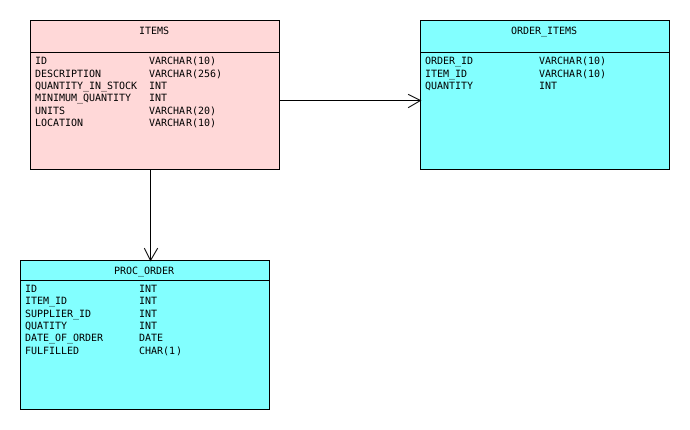
The application model diagrams in these examples show the installed applications for the source environments. It is important to remember that these diagrams show the data relation rules not foreign key references.
The following table definitions are used in these examples.
| Table name | Columns | Description |
|---|---|---|
ITEMS |
ID |
Unique item ID |
SUPPLIER |
ID |
Unique supplier ID |
ADDRESS |
ID |
Unique address ID |
ITEM_SUPPLIER |
ITEM_ID |
Reference to ITEMS.ID |
CUSTOMER |
ID |
Unique customer identifier |
CUST_ORDER |
ID |
Unique customer order ID |
ORDER_ITEMS |
ORDER_ID |
Reference to CUST_ORDER.ID |
DISPATCH |
ORDER_ID |
Reference to CUST_ORDER.ID |
PROC_ORDER |
ID |
Unique procurement order ID |
Example 1: Inventory
In the first instance we will consider an application which deals with the inventory. Tests for such an application would require a variety of different warehouse items, using different units of measure. To obtain an accurate overview, the application would require to access the following tables:
-
ITEMS
-
ORDER_ITEMS
-
PROC_ORDER
Requirements
There is a requirement for inventory data suitable for development of changes in the inventory application.
The data must have items which are counted in weight, length, or volume units (grams, kilograms, liters, meters etc.), and should also contain a mix of other items.
The data should be sourced from a clone of the production database PDB1 and the schema PROD1.
The data should be copied to a test database called TDB1 with schema TEST1.
The Application Model and Version
The application model itself is simple, since it only specifies a name and a description.
Name |
|
To make the application model meaningful, it needs a version. To meet the requirements above we define the version with the following properties:
Name |
|
Modelling connection |
|
Modelling schema |
|
Start table name |
|
Data Relation Rules
With the configuration so far only data from the ITEMS table would be selected.
Data relation rules specify how data is to be selected from related tables.
In this case two data relation rules are added to the version.
Name |
|
Base Schema |
|
Base Table |
|
Columns |
|
Ref Schema |
|
Ref Table |
|
Ref Columns |
|
Name |
|
Base Schema |
|
Base Table |
|
Columns |
|
Ref Schema |
|
Ref Table |
|
Ref Columns |
|
Source and Target Environments
With this configuration the source and target environments used to obtain the test data can now be specified.
Diagram: Installed application for the source environment in example1.
- Source Environment
-
Name
Inventory Source - Start Model
-
Application Model
InventoryVersion
Inventory V1Connection
PDB1Schema
PROD1
| The start model becomes the first installed application on the environment. |
- Target Environment
-
Name
Inventory Target - Start Model
-
Application Model
InventoryVersion
Inventory V1Connection
TDB1Schema
TEST1
The Task Definition
The environments described above can be used in a row level processing task template. An example for setting up the task template and task is provided in the corresponding tutorial.
Example 2: Inventory Enhancement
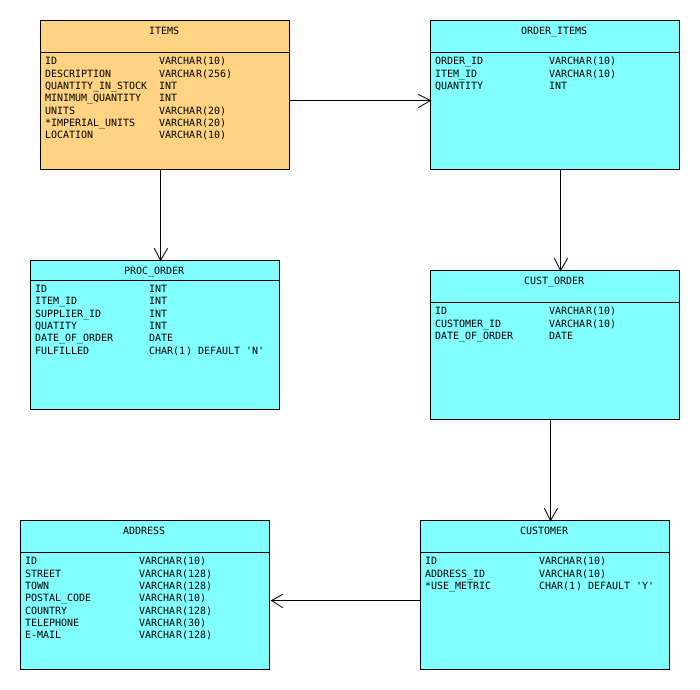
Consider the situation where certain customers wish to send orders using imperial rather than metric units of measure.
The inventory application needs to be adapted to cope with these cases.
To provide the extra information, the table CUSTOMER is given an extra column called USE_METRIC which has the values Y or N.
When the value is N, the customer’s orders are in imperial measure (e.g. pounds or ounces).
The ITEMS table would also require a new column IMPERIAL_UNITS to indicate what the imperial unit of measure is.
The test data for the development of the new inventory application is to be sourced from The TEST1 schema on TDB1 and placed on another connection called DDB1 with schema
DEV1. To provide the data to ensure that the application still provides correct inventory information, one would define two further data relation rules on the application model version to be used.
The base application model would be the same.
The enhanced application would need to access some additional tables:
-
CUST_ORDER
-
CUSTOMER
-
ADDRESS
The Application Model Version
Name |
|
Modelling connection |
|
Modelling schema |
|
Start table name |
|
Data Relation Rules
Name |
|
Base Schema |
|
Base Table |
|
Columns |
|
Ref Schema |
|
Ref Table |
|
Ref Columns |
|
Name |
|
Base Schema |
|
Base Table |
|
Columns |
|
Ref Schema |
|
Ref Table |
|
Ref Columns |
|
Name |
|
Base Schema |
|
Base Table |
|
Columns |
|
Ref Schema |
|
Ref Table |
|
Ref Columns |
|
The three new data relation rules are defined on the TEST1 schema, since this will be used for the source environment.
The data relation rules from Example 1 would need to be adapted and added to the new version of the application model as well.
|
Source and Target Environments
Diagram: Installed application for the source environment in example 2. Additional columns required for the target environment are marked with an asterisk.
- Source Environment
-
Name
Inventory Source 2 - Start Model
-
Application Model
InventoryVersion
Inventory V2Connection
TDB1Schema
TEST1 - Target Environment
-
Name
Inventory Target 2 - Start Model
-
Application Model
InventoryVersion
Inventory V2Connection
DDB1Schema
DEV1
To make the data more meaningful for the development environment where it is to be used, a modification set
with appropriate
modification rules
and modification methods
could be added to the application model version to make metric to imperial conversions.
One rule in the set would employ a modification method to set the value
CUSTOMER.USE_METRIC to N whenever the customer has an address in a country where imperial measures are used (e.g. USA).
Another rule and method in the set could be devised to set the appropriate unit of measure for ITEMS.IMPERIAL_UNITS.
A third rule and method could be used convert the existing
ORDER_ITEMS.QUANTITY to the correct imperial amount where appropriate.
Examples of how to use modification sets can be found in the Modification Sets and Modification Methods tutorial.
Example 3: Procurement
This example will consider a situation where different data is required from the same source tables.
In the first instance a procurement application must create and update orders for items which fall below the minimum quantity.
Such an application might also have responsibility for planning where orders are sourced.
To this end the ITEM_SUPPLIER
table can be used to examine the supply chain.
Suppliers of items for the warehouse will have their own suppliers for parts or raw materials. This leads to a supply chain which goes all the way back to the source of the raw materials. It is important to know whether a supplier sources materials from a region where factors such as natural disaster might affect the availability of materials. In this case the application must ensure that warehouse items are sourced from those suppliers who are most likely to be able to deliver goods reliably.
These requirements must access different data. In the first case, the application only requires data from suppliers who are direct suppliers of the warehouse. This requires data from the following tables:
-
ITEMS
-
ITEM-SUPPLIER
-
SUPPLIER
-
PROC-ORDER
Important here is that rows from the ITEM_SUPPLIER should be those where the column
DIRECT_SUPPLIER has a value of 'Y'.
The second case, that of procurement planning, requires data that includes the full supply chain. The tables which would be required are:
-
ITEMS
-
ITEM-SUPPLIER
-
SUPPLIER
-
ADDRESS
There are a number of ways to satisfy the differing requirements. One possibility is to devise a single application model version with a variety of different data relation rules. The main aspects to note are the use of the data relation rule’s traversal property, the use of a lookup script, the use of condition scripts, and the use of a custom parameter.
As before, the source database and schema are PDB1 and PROD1 respectively, and the target database and schema are TDB1 and TEST1 .
Application Model Version
Name |
|
Modelling connection |
|
Modelling schema |
|
Start table name |
|
Custom Parameter |
|
Data Relation Rules
Name |
|
Base Schema |
|
Base Table |
|
Columns |
|
Ref Schema |
|
Ref Table |
|
Ref Columns |
|
Lookup Script |
|
The Lookup Script for the referenced table only allows direct suppliers to be selected.
+
Name |
|
Base Schema |
|
Base Table |
|
Columns |
|
Ref Schema |
|
Ref Table |
|
Ref Columns |
|
Condition script |
|
This rule is only applied when the custom parameter extractPlanningData is false.
+
Name |
|
Base Schema |
|
Base Table |
|
Columns |
|
Ref Schema |
|
Ref Table |
|
Ref Columns |
|
Traversal |
|
Condition script |
|
This rule is only applied when the custom parameter extractPlanningData is true.
+
Name |
|
Base Schema |
|
Base Table |
|
Columns |
|
Ref Schema |
|
Ref Table |
|
Ref Columns |
|
Name |
|
Base Schema |
|
Base Table |
|
Columns |
|
Ref Schema |
|
Ref Table |
|
Ref Columns |
|
Condition Script |
|
This rule is only applied when the custom parameter extractPlanningData is true.
Source and Target Environments
Diagram: The installed application for the source environment in example 4.
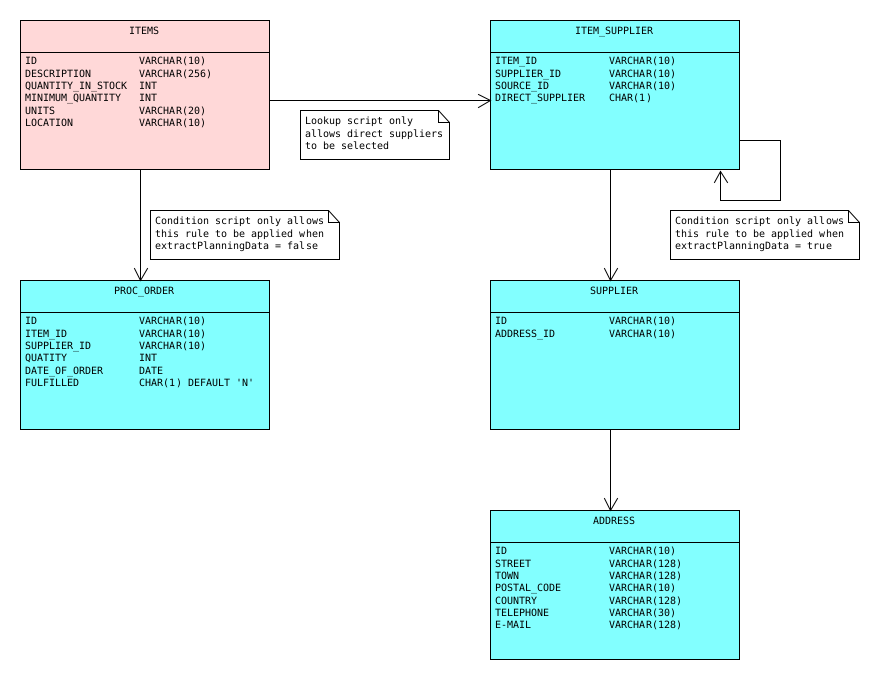
A row level processor task that uses these environments to extract planning data (i.e. with full supply chain) would have to set the custom parameter extractPlanningData to 1 (true).
- Source Environment
-
Name
Procurement Source - Start Model
-
Application Model
ProcurementVersion
Procurement V1Connection
PDB1Schema
PROD1 - Target Environment
-
Name
Inventory Target 2 - Start Model
-
Application Model
ProcurementVersion
Procurement V1Connection
TESTDBSchema
TEST1
Example 4: System Integration Testing with Multiple Databases
In many organizations it is common for data to be stored in logical groups which can span multiple schemas and even databases. XDM can deal with test data requests which involve tables from various groups by defining data relation rules across database boundaries.
Adequately testing how well applications cope with such an arrangement typically requires system integration testing on a regular basis. With large volumes of data, this can be a drain on resources, so it would be helpful to be able to extract a representative sample of test data from all databases, whilst simultaneously maintaining all necessary relationships between tables.
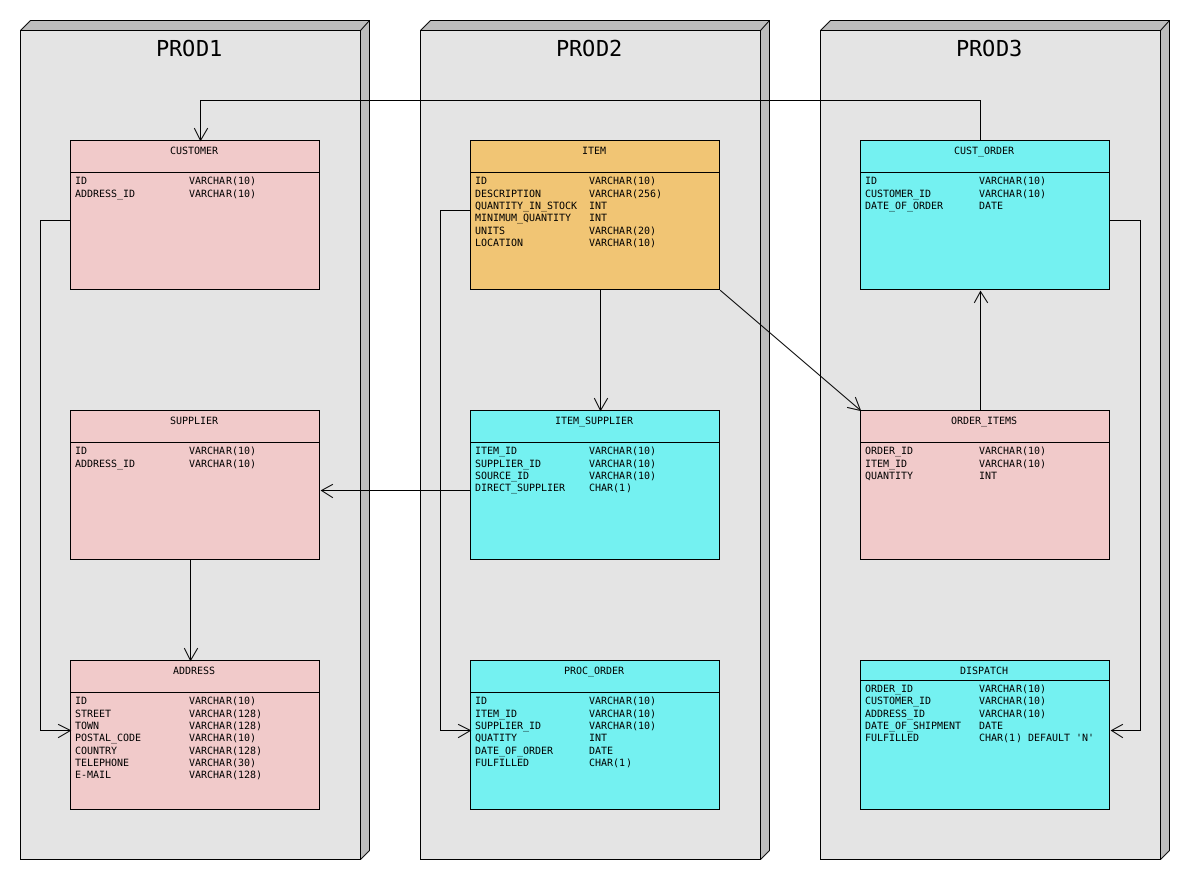
For the purpose of this example we will assume that our warehouse uses the following database arrangement:
Database PROD1 (External Entity Data):
-
EXT.CUSTOMER
-
EXT.SUPPLIER
-
EXT.ADDRESS
Database PROD2 (Stock and Procurement):
-
INV.ITEMS
-
INV.PROC_ORDER
-
INV.ITEM_SUPPLIER
Database PROD3 (Customer Orders):
-
ORD.CUST_ORDER
-
ORD.ORDER_ITEMS
-
ORD.DISPATCH
Requirements
The target environment should be restricted to a single database called SYSTEST.
When extracting test data with more complex requirements, there are a number of aspects to be taken into consideration before deciding on appropriate application models. In the environment descriptions for this example, there are a number of application models which contain only one table. Why would one wish to do this?
Consider the tables in the PROD1 database.
These could effectively be contained in a single application model.
However, as previously explained, data relation rules which reference tables in another schema or database should only reference the start table of the referenced application model.
As shown in the diagram below, both CUSTOMER and SUPPLIER are referenced from outside the PROD1 database.
It would be best if they were start tables in an application model.
One might, therefore, place CUSTOMER and ADDRESS in one application model and SUPPLIER and ADDRESS in a second one.
Such an approach would be legitimate, but again there are good reasons for not doing this.
For instance, there might be a need to use reduction rules, column exclude rules, column specification rules, and so on.
Such requirements can change with time.
These rules are all defined on the application model.
If the ADDRESS
table is contained in two application models, then any such rules need to be maintained in both models to keep the extraction process consistent.
For this reason the ADDRESS table is also contained in its own application model.
Of course, if you are certain that such rules will not be required, then the dual application model approach described above will work just as effectively.
Since there are going to be data relation rules which reference tables in other application models, it is necessary to define the referenced models before the referencing models. The order can easily be derived from the following diagram. The DDL files with dummy data for the example tables and the pre-configured XDM objects (Application models, environments, data relation rules, task, task templates) can be downloaded via the following links:
First Application Model
Name |
|
Contains the table ADDRESS only.
This is the first application model to be defined, because it is referenced, but does not reference any other application models.
Second Application Model
Name |
|
Contains the table SUPPLIER only.
It references the application model
Address.
Third Application Model
Name |
|
Contains the table CUSTOMER only.
It references the application model
Address.
Fourth Application Model
Name |
|
Contains the tables CUST_ORDER, ORDER_ITEMS, and DISPATCH
References application models Customer
Application Model Version
Name |
|
Modelling connection |
|
Modelling schema |
|
Start table name |
|
Data Relation Rules
Name |
|
Base Schema |
|
Base Table |
|
Columns |
|
Ref Application Model |
|
Ref Schema |
|
Ref Table |
|
Ref Columns |
|
Name |
|
Base Schema |
|
Base Table |
|
Columns |
|
Ref Schema |
|
Ref Table |
|
Ref Columns |
|
Name |
|
Base Schema |
|
Base Table |
|
Columns |
|
Ref Schema |
|
Ref Table |
|
Ref Columns |
|
Fifth Application Model
Name |
|
Contains the tables ITEMS, ITEM_SUPPLIER, and PROC_ORDER.
References application models Customer.
Application Model Version
Name |
|
Modelling connection |
|
Modelling schema |
|
Start table name |
|
Data Relation Rules
Name |
|
Base Schema |
|
Base Table |
|
Columns |
|
Ref Application Model |
|
Ref Schema |
|
Ref Table |
|
Ref Columns |
|
Name |
|
Base Schema |
|
Base Table |
|
Columns |
|
Ref Schema |
|
Ref Table |
|
Ref Columns |
|
Name |
|
Base Schema |
|
Base Table |
|
Columns |
|
Ref Schema |
|
Ref Table |
|
Ref Columns |
|
Name |
|
Base Schema |
|
Base Table |
|
Columns |
|
Ref Application Model |
|
Ref Schema |
|
Ref Table |
|
Ref Columns |
|
Name |
|
Base Schema |
|
Base Table |
|
Columns |
|
Ref Schema |
|
Ref Table |
|
Ref Columns |
|
Source and Target Environments
In this case both source and target environments require five installed applications. The first installed application on is also the start model in both cases. With the given configuration the two environments are completely compatible, so the toleration mode can be set to Strict.
- Source Environment
-
Name
Production - Start Model
-
Application Model
Stock and ProcurementVersion
Stock and Procurement V1Connection
PROD2Schema
INV - Second Installed Application
-
Application Model
Customer OrdersVersion
Customer Orders V1Connection
PROD3Schema
ORD - Third Installed Application
-
Application Model
CustomerVersion
Customers V1Connection
PROD1Schema
EXT - Forth Installed Application
-
Application Model
SupplierVersion
Supplier V1Connection
PROD1Schema
EXT - Fifth Installed Application
-
Application Model
AddressVersion
Address V1Connection
PROD1Schema
EXT - Target Environment
-
Name
System Test - Start Model
-
Application Model
Stock and ProcurementVersion
Stock and Procurement V1Connection
SYSTESTSchema
TEST2 - Second Installed Application
-
Application Model
Customer OrdersVersion
Customer Orders V1Connection
SYSTESTSchema
TEST3 - Third Installed Application
-
Application Model
CustomerVersion
Customers V1Connection
SYSTESTSchema
TEST1 - Forth Installed Application
-
Application Model
SupplierVersion
Supplier V1Connection
SYSTESTSchema
TEST1 - Fifth Installed Application
-
Application Model
AddressVersion
Address V1Connection
SYSTESTSchema
TEST1