Object Selection with Rules
Data Selection with Rules
This chapter describes how to control which database objects are compared or copied in XDM by using Selection Rules and Exclude Rules. These rules are used in various tasks that work with database structures, for example:
-
Structure Compare
-
Structure To Icebox
-
Table Copy (native and compatibility)
-
Table To Icebox
For these task types, at least one selection rule must be defined either in the task template or in the task. It is possible to create and execute one of the tasks mentioned above that has neither selection rules in the template nor in the task. However, doing so will result in an error message in the first stage of the task execution.
Concept Overview
Selection Rules
Selection rules specify which objects should be compared in any XDM task which needs to compare database structures. Selection rules are defined on Table, Sequence, and View objects in the source database. These objects are always specified via their name. When selecting one of these objects, such as a table, XDM will also select all dependent objects, such as indexes, grants, constraints, or aliases.
The sum of all specified selection rules build a selection set which contains the objects that should be compared or copied. It is also possible to reduce this selection set using Exclude Rules (see Exclude Rules).
Exclude Rules
Exclude rules specify objects that should not be part of the selection set. Objects that match an exclude rule will not be compared within a structure compare task, even if the same objects match one of the defined selection rules. Of course, this applies to structure to icebox tasks, table copy tasks and table to icebox tasks as well.
Excluding specific objects is useful, especially if wildcards are used in the specified selection rules.
With a configuration such as % for both schema and name pattern in the selection rule, a very large number of objects might be selected.
The selection set can be reduced explicitly by excluding specific tables or other objects.
As for selection rules it is also possible to use wildcards when defining schema or name pattern in an exclude rule.
In addition, it is possible to define an inverted exclude rule, which excludes every object that does NOT match the rule’s pattern. This inverts the behavior of a conventional exclude rule.
Using Selection Rules in XDM
Specification of Selection Rules in XDM
To add a selection rule, specify the object type, the schema, and the name of the object in the selection rule panel.
The wildcard % can be used in the schema and name patterns to apply the selection rule to multiple objects of the selected type.
It is also possible to add selection rules for application models. In this case, all tables used in this application model are selected in the task.
To add such a selection rule for an application model, select Application Model
in the drop-down box Selection type and choose an application model with its corresponding version in the boxes below.
For more information on selection rules see Selection Rule Reference.
Using Exclude Rules in XDM
Specification of Exclude Rules in XDM
To add an exclude rule, specify the object type, the schema and the name of the object in the exclude rule panel.
The wildcard % can be used in the schema and name patterns to apply the exclude rule to multiple objects of the selected type.
To specify the exclude rule as inverted, use the checkbox labeled Invert (Exclude all objects not matching this rule) below the schema and name pattern specification.
For more information on exclude rules see Exclude Rule Reference.
Examples
The following examples illustrate common scenarios for selecting and excluding tables by using patterns and application models.
-
Example 1: Three specific tables in one schema
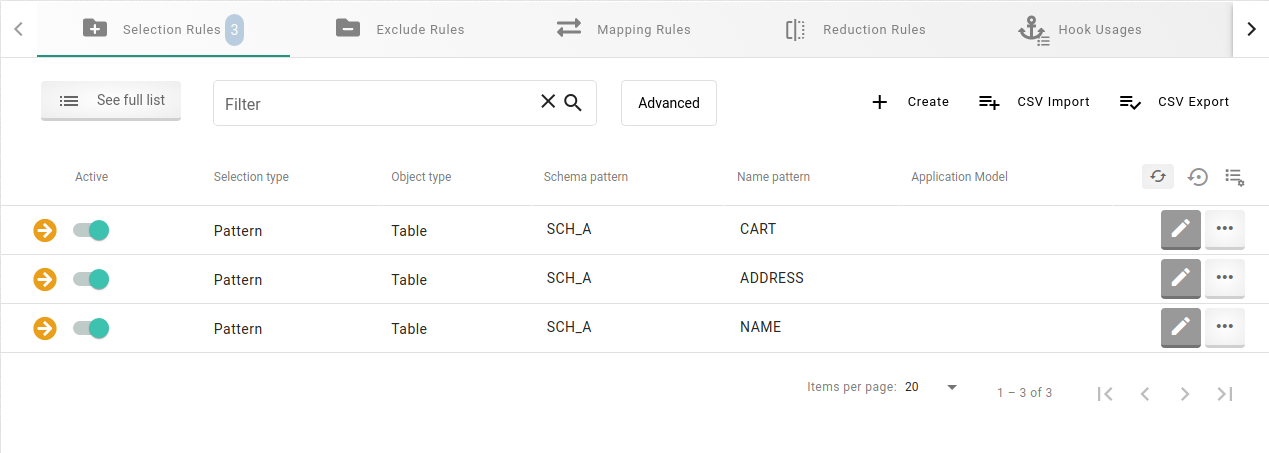
You want to select three specific tables in a single schema and copy them into another database. To do so you should specify three selection rules with each one selecting one of the three tables. For every of these rules, enter the respective schema name in the field Schema pattern, and the table name in the field Name pattern.
+
You want to copy a whole schema to another database, for example, to copy a specific schema from a production database to a testing database.
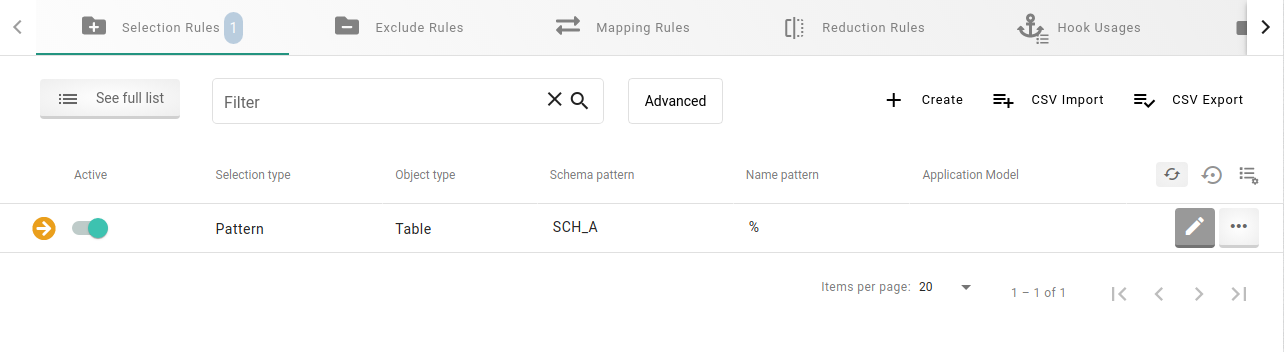
In this case you should add a selection rule with the schema name in the field Schema pattern.
In the field Name pattern, enter a single percent sign (%) as a wildcard.
This matches every table name in the specified schema.
+
-
Example 3: Tables differing in one letter
You want to copy some tables that are located in a given schema and all the table names differ only in one letter.
For example, you want to copy the tables BEAR and BEER, but not the table BEEF.
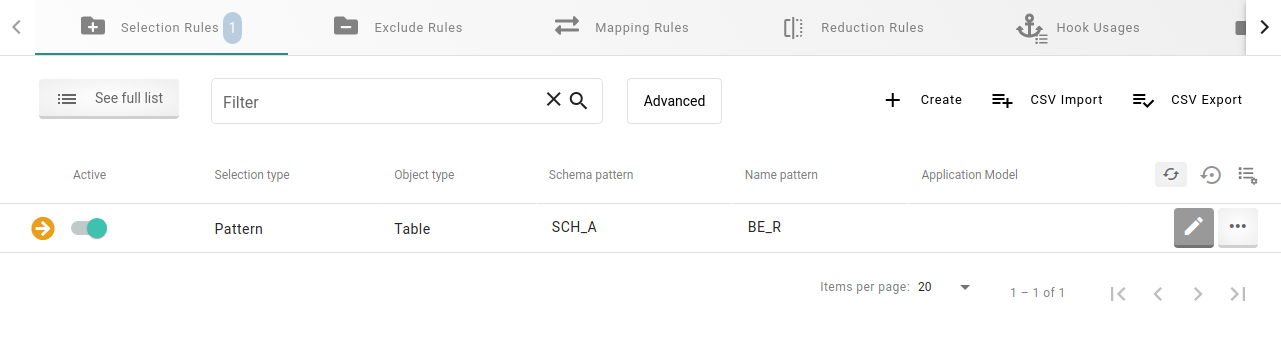
In this case, you should enter the schema name in the field Schema pattern.
In the field Name pattern, specify a single underscore at the position, where the names differ.
In our example, the expression is BE_R.
The underscore acts as a wild card and causes the selection rule to match all tables beginning with BE, followed by exactly one arbitrary letter, and then the letter R.
The two tables BEAR and BEER will be copied, but not the table BEEF.
To copy all three tables, you could use the expressions BE__ or BE%.
+
-
Example 4: Whole schema with specific tables excluded
You want to compare objects between two environments.
More precisely, a whole schema should be selected, but there are several tables that should not be part of the comparison.
To achieve this, you would add a selection rule and specify the table schema in the field Schema pattern.
In the field
Name pattern, enter a single percent sign (%), as seen in
Example 2.
The percent sign acts as a wild card and results in the selection of all tables in that schema.
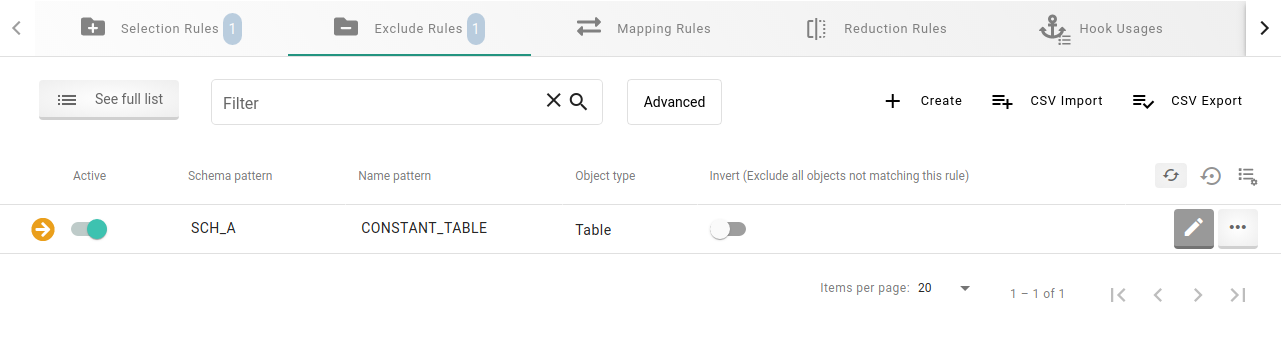
To exclude a specific table you do not want to be compared in this structure comparison, add an exclude rule and specify Schema pattern as in the selection rule and enter the name of the table to be excluded in Name pattern.
The image below shows an exclude rule that excludes the table CONSTANT_TABLE from the selection set.
+
-
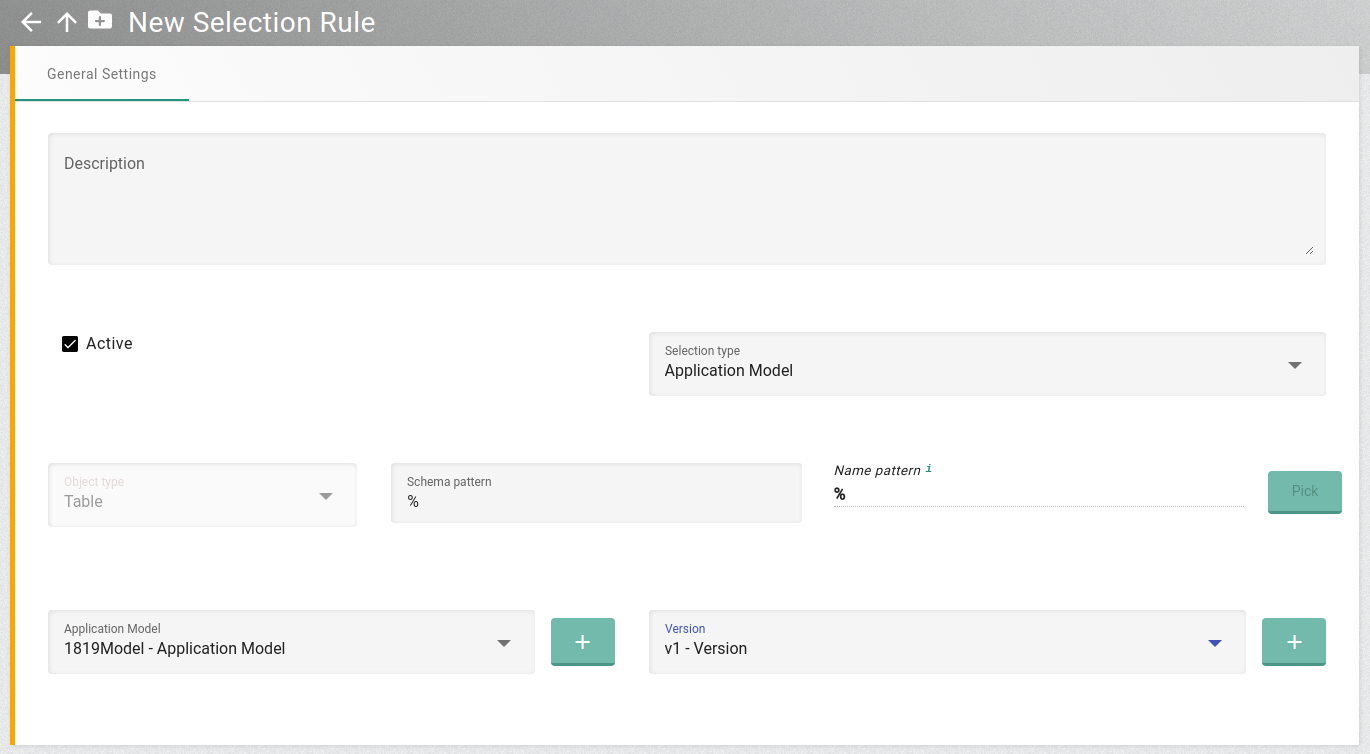
Example 5: Use an Application Model in a Table Copy Task
You have defined an Application Model in XDM and want to copy all the objects that are accessed in this application model within an XDM Table Copy Task (applies for both native and compatibility table copy tasks).
You are able to use such an application model by defining a selection rule with its Selection Type Application Model instead of Pattern.
You can now select one of your application models and its version.
The selection set will then consist of every object, that is accessed in the application model.
+
-
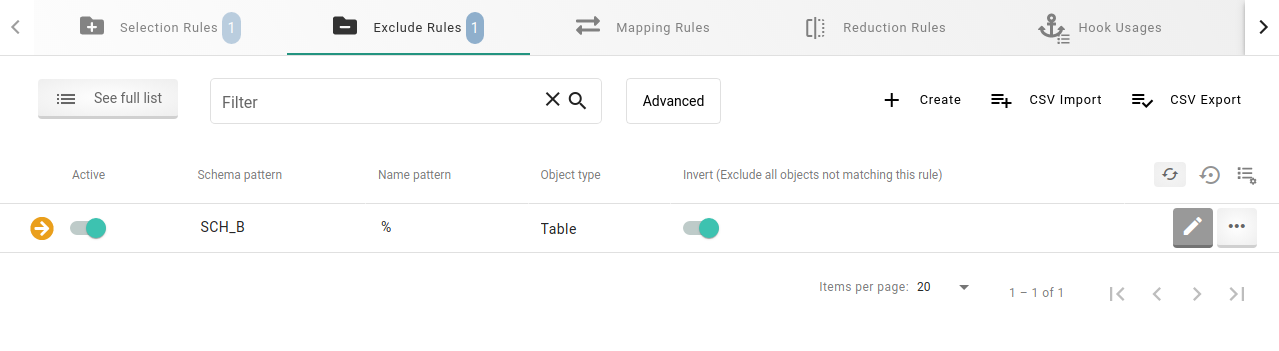
Example 6: Subset of an Application Model via inverted Exclude Rule
A more precise example with the use of an application model in a selection rule: You have specified an application model, but you only want to select and copy a specific subset of the objects accessed in this application model.
In this case you can at first define a selection rule as shown in the example above.
Subsequently, you would define an inverted exclude rule to specify the objects that should be part of the selection set.
Such an inverted exclude rule specifies that the objects which do not match the exclude rule should be excluded from the selection set.
An example could be that you only wish to use those objects accessed in the application model which belong to a specific schema and exclude all objects not belonging to this schema.
To achieve this, you would define an inverted exclude rule with the required schema in the Schema pattern and the wildcard % as
Name pattern.
+
Combinations of the above scenarios are, of course, possible.
Scope for Exclude Rules
Technically, it is possible to define a scope for exclude rules in a table copy task.
However, this is not practical, since both native and compatibility table copy tasks ignore exclude rules with scope Target.
For this reason scope Source is selected by default.
The main purpose of a table copy task is copying data, so it makes no sense to exclude anything after the data has already been selected.
A structure compare task, on the other hand, compares structures without copying anything, in which case it can be useful to exclude items from the report after the comparison.
This is especially relevant for exclude rules on columns: here, both Source and Target
scope can be used in a meaningful way.
Column exclude rules do not change the selection set
of objects for the task, but they do control whether data (or structure) of specific columns is processed on source or target side.
Using the scope on column-level exclude rules is therefore a practical application of the scope setting.
An example of when to use an exclude rule with scope Target is shown in
the chapter describing
object selection in structure compare tasks.
Scope for Exclude Rules
Additionally exclude rules can be defined for different scopes, specifically
the scopes Source and Target. This will affect the object(s) that should
be excluded.
Specifying an exclude rule with scope Target is only useful for the XDM task types
structure compare task and structure compare from icebox task. That is because for a
structure comparison there may be objects like for example grants that differ between
source and target.
A scenario might be that objects should be compared between a
production environment (defined as source) and a testing environment (target). Then
of course there may be differences in grants between these two environments, which are
known even before the comparison. Such accepted differences should not be part of the
comparison. To exclude these objects in the target, an exclude rule can be defined with
scope Target to avoid a comparison.
In contrast to structure comparison, an exclude rule with scope Target could also be
defined in an XDM table copy task. However, this is not very useful as the main purpose
of a table copy task is to actually copy data while a structure compare task should only
compare structures.
To select a specific scope when creating an XDM exclude rule, select scope Source to apply the exclude rule to source objects or scope Target to apply the exclude rule to target objects.
Example
You want to compare structures between a testing environment and a production environment,
knowing that there are differences in grants between these, that should be ignored.
Assuming we have the production environment as source and the testing environment as target, we
know that different grants for testing users do not exist for the production environment.
To avoid these grants to be compared you can then define an exclude rule, that specifies these
grants and set the rule’s scope to Target. Through this a valid structure comparison can be
executed without having known differences as a result shown in the reports.